Showing posts with label SmartBoard. Show all posts

September 05, 2012

SMARTBoard Software Download

If you've been upgraded to Lion, you'll definitely want to upgrade to the Smart Software Version 11 for your SMARTBoard. We hoped the older version would work on lion, but it won't.
Here is the link to for that Software.


If you didn't upgrade to lion and need to install the SMART software, use the link in this blog post from last year. The older versions of SMART are still available.
Highland teachers: Let me know if you need the Activation Code. I'll email it to you!


September 04, 2012

Wishing SMART was Smarter...

It's the start of a new year, and for many of us the start of Mac's new Lion operating system.
Woohoo?

Here at Highland that also means many of us got switched to the new SMART Notebook version 11 which looks and acts different than it did last year. Here are two things we're noticing.

1. There is this little SMARTInk Layer button that seems to show up on everything now. Why?


Here is a short little video that explains what it is and how to use it.


It can be kind of handy, but if you don't like it you can turn it off when you disconnect your SMARTboard.  Just click that little down arrow and choose Erase and Hide. (This option only shows up when the board is disconnected).

2. The other thing we've noticed is this obnoxious display glitch when you try to go full screen!


Yes, this a ridiculous issue. Why don't we have the option of making "Entire Page" the default? Why wasn't that already the default?  Here's me wishing SMART had been a little smarter on this one...

September 02, 2011

How To Introduce Your Brand New Smartboard

Here she is, implementing New Technology with sagacity and charm
Our entire school got new SMARTboards this year. Every classroom, every teacher, whether they wanted one or not. We didn't exactly do this on purpose. I'm a big believer in letting the teacher decide how and what will be their best use of technology, but our parents got really excited about this one. And when parents get this excited about spending money on their kiddos...you just nod your head and say, "Rock on Bro!"

So there it is...all shiny and white and new...
 And the kids are gonna be Soooo excited!

Now if you could just figure out what to do with it.
Here are a couple of ideas that may give you a jumpstart.
There are a bunch of great "Back To School" Notebooks on the Smart Exchange website. Here are a couple I recommend:


Simple Attendance Taker for K-2

For the younger kiddos (about K-2)
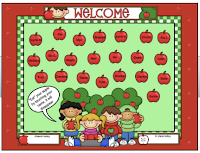
This is one page of pure learning simplicity. You just change the names on the apples to your kid's names. The kids touch their apple and it disappears (with a cute little chewing sound). This way they all get to touch the board the first day (that matters if you're them! :))


Back To School Activities for K-2
Back To School Activities for 3-5
I like these next two, because they're longer and give a great overview of a bunch of SMARTboard functions.

Engaging.

Also, the teacher notes (little pull downs on the top left) for each page are really well done.

Just click the links, download them and start playing around. You don't have to be plugged into the board in order to get yourself oriented to the software and you can't hurt anything. No matter what you do on this first week back, if you let them touch the SMARTboard, you'll for sure be the uncontested, most awesome teacher ever.

I'm just sayin...

DOWNLOAD  Software Now
Also, If you haven't downloaded the SMART Notebook software, here is the post about how to do that. (Highland: I'll email the code out as soon as I get access to my email account, but you can download and get started without the code and add it in later)

April 08, 2011

Smart Board Tutorials

I did some poking around on the SMART Website, and... shoot! There's a lot of stuff there.
Overwhelming!
But I did the work for you and pulled out the gems. If you're anxious to learn to use the SMART boards, I think you'll want this.
  • First: Take a look at this 4 minute video. It'll totally inspire you and maybe teach you a couple of things in a really painless way!

  • Next: Here are some online tutorials. They are basic and not entertaining, but they get you the information you need to start feeling comfortable with the Boards and you can do it in front of your fireplace if you want (that's always a big deal for me...Central Oregon spring...you know).
(PS. A word to the wise...Don't bother with what is called the SMART Learning Space. Bleh! Unless you're in the mood to poke your eyes out with blunt objects. Go with these little videos instead to get a hold of the basics! They're only 3-6 minutes each, so that's awesome!)

1. Finding What you Need(4:01)
2. The Ink Layer(2:55)
3. The Lesson Activity Toolkit(5:40) (Ahha! This one's totally helpful. This will get you started creating cool whiteboard lessons. And it's only 6 minutes long, so...Yay!
4. Managing Pages (2:55) (You'll want to understand this when you start getting the hang of creating lessons. This is necessary for organizing them.)
5. Properties Tab & Page Recording (3:40)(more advanced stuff here)
6. New Tools in Notebook 10 (5:59)(Skip the first 2 minutes of this...it's a tool we don't have at this point. The rest is good info though.
  • Finally: Here's an awesome tool. Print out this little document and it walks you through the creation of an interactive lesson. A GREAT way to get the gist of the Smart Board tools.


Phwew! That took awhile, but they're good resources. I sure hope it helps some of you.
Happy SMART Boarding my friends!!
~Jen

FYI-Here is the webpage that I pulled all these off of. It was hard to find...so I'm saving it right HERE!

March 30, 2011

Downloading the Smart Software

I'm on a theme.
My Theme is:
Put the important stuff all in a place where it can stay and is easy to find. Gaze to the right side of this page. Nice little Topic list, huh? Printers, Smart Board, Laptop Cart...(I'll keep adding things as I realize you need them. Also, I'll try to make it fun to go here...ie. fishies to feed...that matters too! *grin *)

So on that theme, here's the place where you can download the SMART software.
If you got a new computer, you'll probably need to do that.

Here's the link.
SMART Software Download

And I have a code that works, but I don't really want to post it here so just drop me a quick email and I'll send it to you in a flash!


Let me know if you need any help.
~J
Related Posts Plugin for WordPress, Blogger...